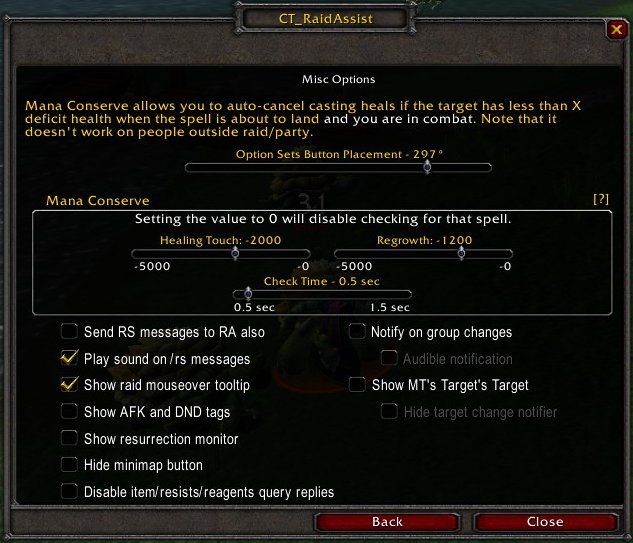
With this slider you are able to rotate the quickmenu-button around the minimap, so it doesn't interfere with any other AddOn you might have installed, that is using this feature.
This is undoubtedly one of the most useful feature of CTRA for healing classes, because health/mana and all the other useful information can only be processed by CTRA, if everyone has it actually installed. Here you can configure thresholds when to cast or interrupt one of your healing-spells. Please note that this is a very subjective setting, so please don't just use mine, but experiment with it. It all depends on the effectiveness of your healing-spells and gear you wear (+x healing, etc.).
My settings -2000 Healing Touch, -1200 Regrowth explained: Healing Touch is the druids "big" heal and with all my gear and talents it heals about 2000 HP. Note, that the values you configure here are negative values, which basically means that you configure to cast the spell when the target has lost more than this specified value of HP, if not the cast will be interrupted to conserve mana. I configured this mainly to suit main tanks, because for a mage or a rogue a Regrowth (the smaller version) is sufficient in 90% of all situations. If i would cast Healing Touch on them, i would significantly "overheal" them and thus would have wasted (precious) mana.
The Check Time indicates in what intervals to poll the Hitpoints of all raid-members. Keep this at the minimum time available, unless you experience problems with this (e.g. lag).
These options are mainly for customizing less important settings. A notable setting for "rezzers" is the Resurrection Monitor, which i recommend to disable and set a key-binding to toggle it on demand, when rezzing after a near-wipe. Then you will see a little window on your interface, which allows you to see who is rezzing whom.
The "mouseover tooltip" is a useful and nifty feature, which provides all kind of information. On a warlock you can see when he/she can cast a Soulstone again, if you hover over a buff you can see how long it will last, etc.
The option Show MT's Target's Target can be quite useful, too. The name of this option is a bit confusing, though. All it does is to not only display the MT-windows, but also whom the mob has targeted at the moment. This should be the MT on the mob, but if the MT looses aggro, you can see where the mob is heading.
Please don't check the option "Disable item/resists/reagents query replies"! This is an important source of information for the current raid-leader and his/her assistants.